USED IN 50+ COUNTRIES
#1 Rated Employee Screen Recording Software
Manage better with ethical clarity and performance-focused oversight.

Manage better with ethical clarity and performance-focused oversight.
Keep workflows visible and productivity high with smart employee activity tracking.

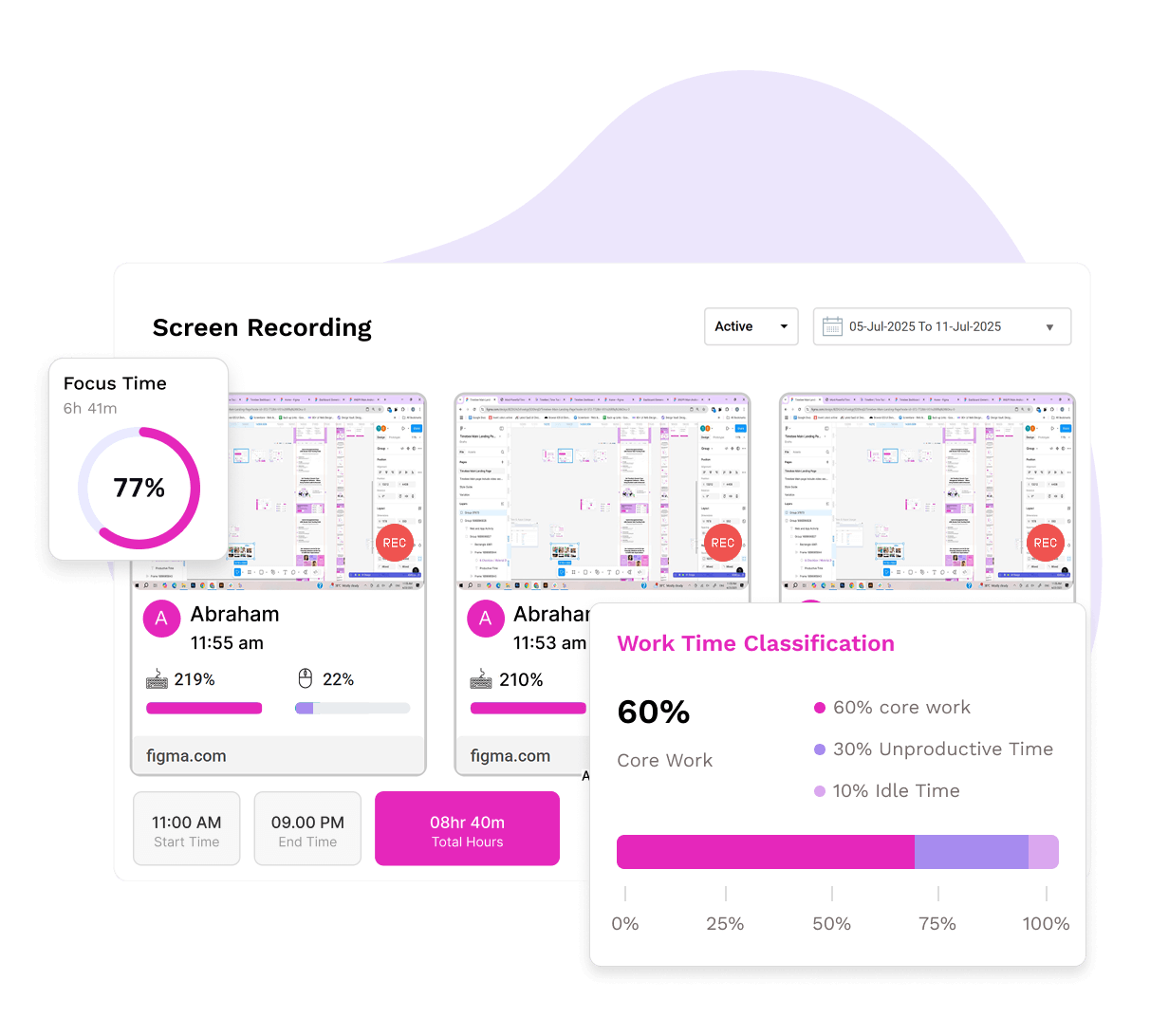
Get a visual trail of tasks with TimeBee’s timestamped, user-tagged screen records captured at set times.


Define capture frequency at the organizational or individual level within the desktop monitoring software.


Track mouse clicks and keystrokes with detailed percentages based on predefined frequencies.

Turn daily screen activity into actionable, performance-boosting data.

Foster accountability and transparency through regular oversight of your staff's daily activities.

Use screen recordings to spot workflow issues and improve productivity with clear visual insights.

Reduce client friction and build trust by showcasing exactly how work is progressing, screen by screen.

Maintain compliance with company policies and industry regulations through continuous screen recording.

Every screen tells a story, and TimeBee helps you see it right.

Flexible and lightweight tracking options that don’t get in your way.


Track multiple screens per user with our employee screen recording software for complete visibility.

Filter screen records by date, user, or team, and switch views between active and archived statuses.

Zoom in, go full-screen, or view in slideshow mode to review screen captures in your preferred style.

See which website or app was in use at the time of each screen record for full visibility into user behavior.

Use our screen recording app for employees to archive captures and keep your workspace organized.

Even offline, TimeBee captures activity and uploads screen captures once the connection is restored.
Understand not just what’s on the laptop screen, but how tasks flow from start to finish.

Track every website and application by predefined categories to increase productivity and performance.

See how much time was spent on productive, neutral, or unproductive tasks in a daily summary view.

TimeBee flags idle time automatically when there is no mouse movement or keyboard activity.

Get a clear breakdown of billable and non-billable hours to spot patterns and optimize output.


Track every website and application by predefined categories to increase productivity and performance.
See how much time was spent on productive, neutral, or unproductive tasks in a daily summary view.
TimeBee flags idle time automatically when there is no mouse movement or keyboard activity.
Get a clear breakdown of billable and non-billable hours to spot patterns and optimize output.
Teams using TimeBee see a 42% increase in employees' productivity within the first 3 months.

Companies recover over 4 hours per employee per month, resulting in a 650% return on investment.
Managers observe a 54% increase in punctuality and fewer late logins after implementing TimeBee.
Time theft drops significantly as employees become more focused and accountable.

Balance trust with accountability in every screen and session.

Yes, recording employee screens during work hours is generally legal when done for legitimate business purposes. Employers have the right to monitor company-owned PCs to ensure productivity, data security, and compliance with company policies. To stay compliant and ethical, it is important to inform employees that screen monitoring is in place.
